Everything Diskling does
Find what’s filling your disk, clean it without guessing, remove apps completely, and keep it from filling up again. Free shows you all of it. Pro does the work in one go.
macOS 14 Sonoma or later · Apple silicon and Intel · About 36 MB · No account
01 · Find space
See where your space went
One scan maps your whole disk and names what made each folder, so a big gray System Data bar turns into a list you can act on.
How the map and search work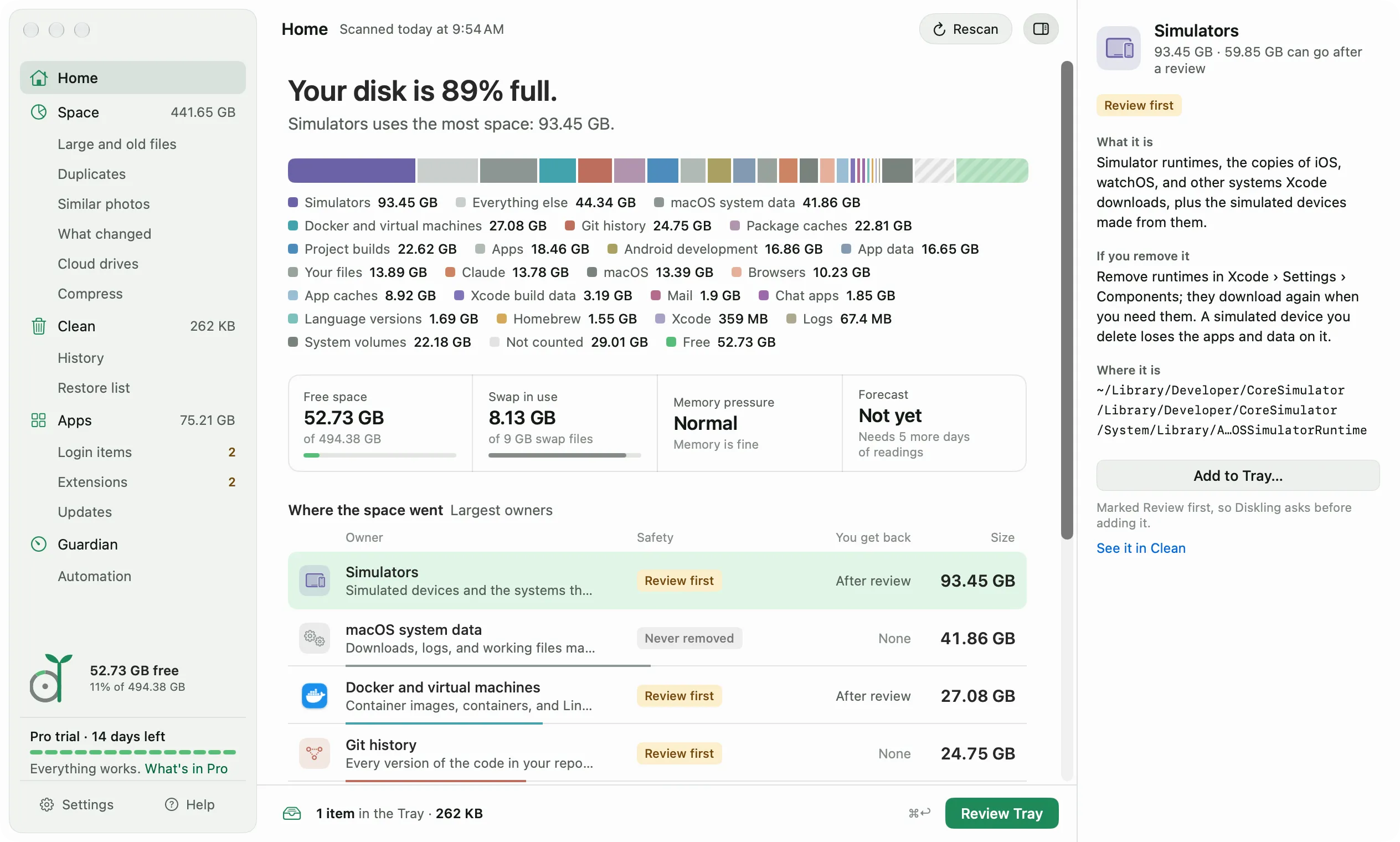
An owner for every folder
FreeDiskling names what made each gigabyte, like Xcode, Docker, or Chrome, from hand-written rules with sources.
Plain-word explanations
FreeEvery item says what it is, who owns it, and what happens if it goes, marked Safe, Rebuilds, or Review first.
Two Home layouts
FreeLedger ranks every owner. Start here puts one recommendation first. Switch in Settings or the View menu.
Space map
FreeRings and a list of every folder by size and owner, with Quick Look on the space bar and full keyboard control.
Search with filters
FreeFind files and folders from the scan, plus smaller files from Spotlight, by kind, size, and date.
Sizes that count clones once
FreeSizes count only what removing would free. APFS clones, like the ones pnpm, Bun, uv, and Finder’s Duplicate make, count only their own blocks.
Weekly full scan
FreeQuick scans read only what changed. Once a week Diskling scans everything again in the background, in about 30 seconds, so sizes stay exact. On by default.
Large and old files
FreeEvery file over 100 MB with when you last opened it. Remove one at a time on Free.
What changed
ProFolders that grew, are new, or shrank since yesterday, last week, or last month.
Other drives
ProMap external and network drives too, rescanning only what changed.
Guided Full Disk Access
FreeA short walkthrough turns green on its own when access is on. Without it, Diskling still works and says what it couldn’t count.
Expert mode
FreeFull paths, exact bytes, and the rule that claimed each item, for when you want every detail.
02 · Clean
Clean without guessing
Clean ticks only what’s safe, gives every line a reason, and clears developer tools with their own commands.
How Diskling decides what’s safe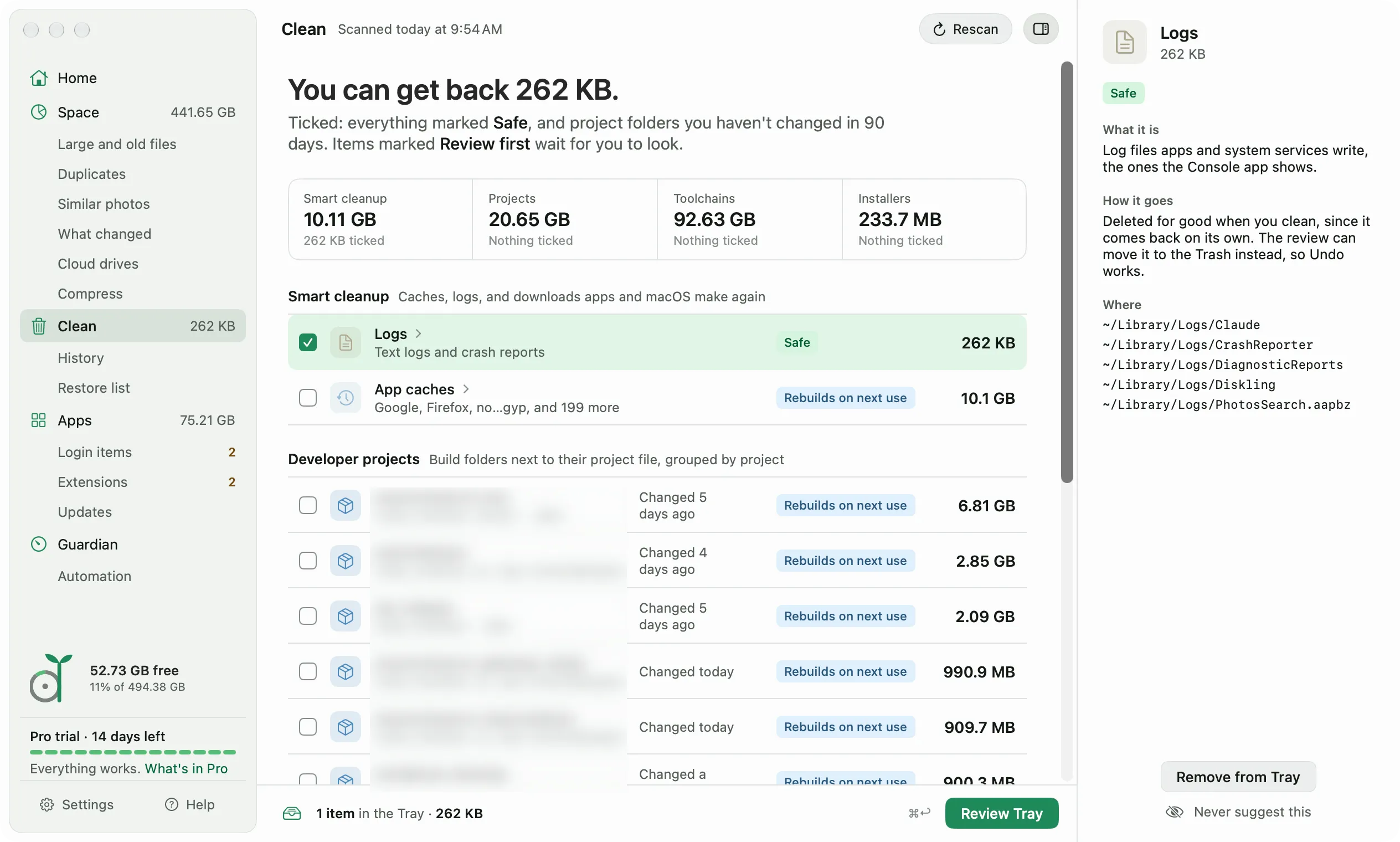
Smart cleanup
ProCaches, logs, and downloads that apps and macOS make again. Only Safe items are ticked. Preview is free.
Developer projects
Pronode_modules, vendor, target, DerivedData, and more, grouped by project, ticked only after 90 days untouched. Git-tracked files never go.
Developer toolchains
ProiOS simulators, Docker, Claude Code transcripts, and package caches like npm, pip, Go, and Homebrew, cleared with each tool’s own command.
Simulator data and device support
ProThe logs, caches, and downloads each shut-down simulator collects, and Xcode’s debug files for older device versions. The simulators’ apps and the newest version for each platform stay.
Claude and Claude Code
ProThe Cowork virtual machine, the app’s web cache, and Claude Code transcripts, each explained. Transcripts clear with claude purge, and the VM is never removed.
Leftovers and installers
ProData from apps you already removed, and DMG, PKG, and ZIP installers, marked when the app is already installed.
Device firmware
ProiPhone, iPad, and Apple TV restore files Finder downloaded, marked Safe. Finder downloads them again when you need them, and device backups are never touched.
Browser copies and wallpaper renders
ProOld copies Chromium browsers leave after updates, counted by the space they really free, and the desktop pictures macOS keeps drawing. The ones on screen stay.
Never suggest this
FreeHide anything you want to keep from every future suggestion. Undo it in Settings, Scanning.
03 · Safety
Nothing goes until you’ve seen it
Every tool feeds one Tray, and every removal starts with a review that shows each item and how it goes.
How the Tray and review work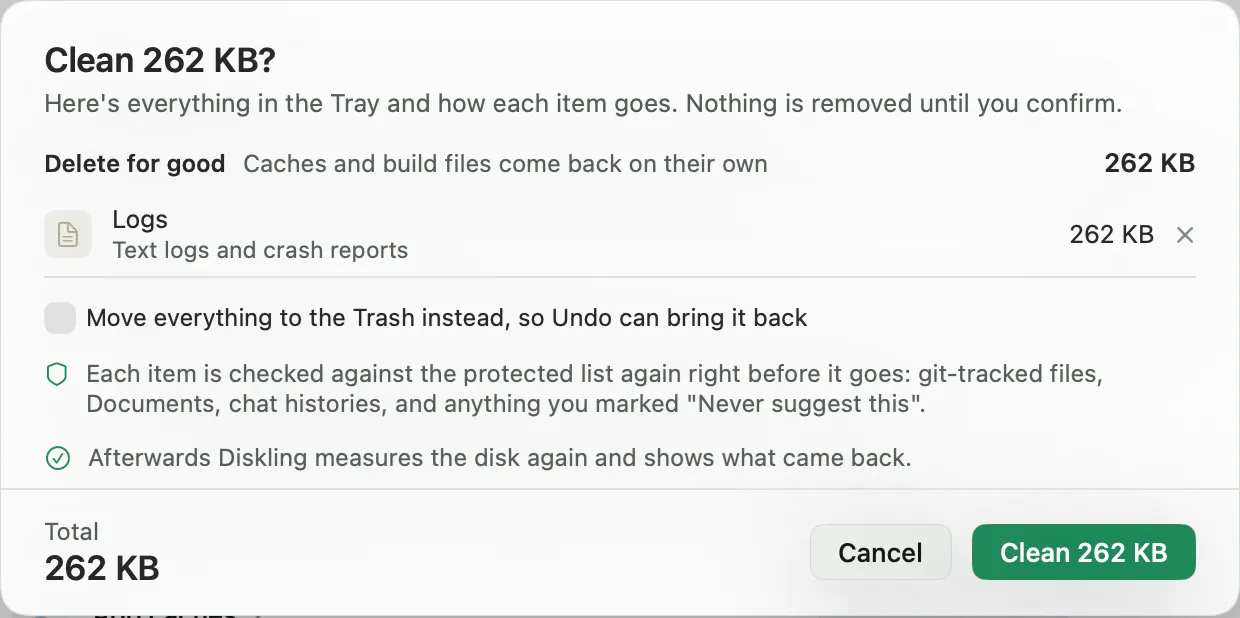
One Tray, one review
FreePick from any screen, then Review Tray shows every item and how it goes before anything is removed.
Protected list
FreeChecked again right before each item goes: git-tracked files, your own files in Documents and Desktop, chat histories, Photos libraries, and anything you protected.
Trash first, with Undo
FreeFiles go to the Trash so Undo can put them back. Caches and build files are deleted, since they come back on their own.
Backup check
FreeBefore a removal, Diskling says whether Time Machine is set up and, when it can read it, when the last backup ran.
Measured, not estimated
FreeAfter a cleanup, Diskling measures the disk again and shows what really came back. Docker’s space is measured again five minutes later, since Docker returns it slowly.
History
FreeEvery cleanup, uninstall, and rule run with the space it gave back. Free shows 7 days, Pro every run with charts.
Restore list
FreeOffloaded files with Bring back, checked byte for byte, and how to get back what a tool’s command removed.
Share card
FreeA picture of the space you got back, with no file names and nothing about your Mac.
04 · Files
Keep the files, lose the bulk
Find copies you don’t need, shrink what you keep, and move what you rarely open somewhere else.
How duplicates and similar photos work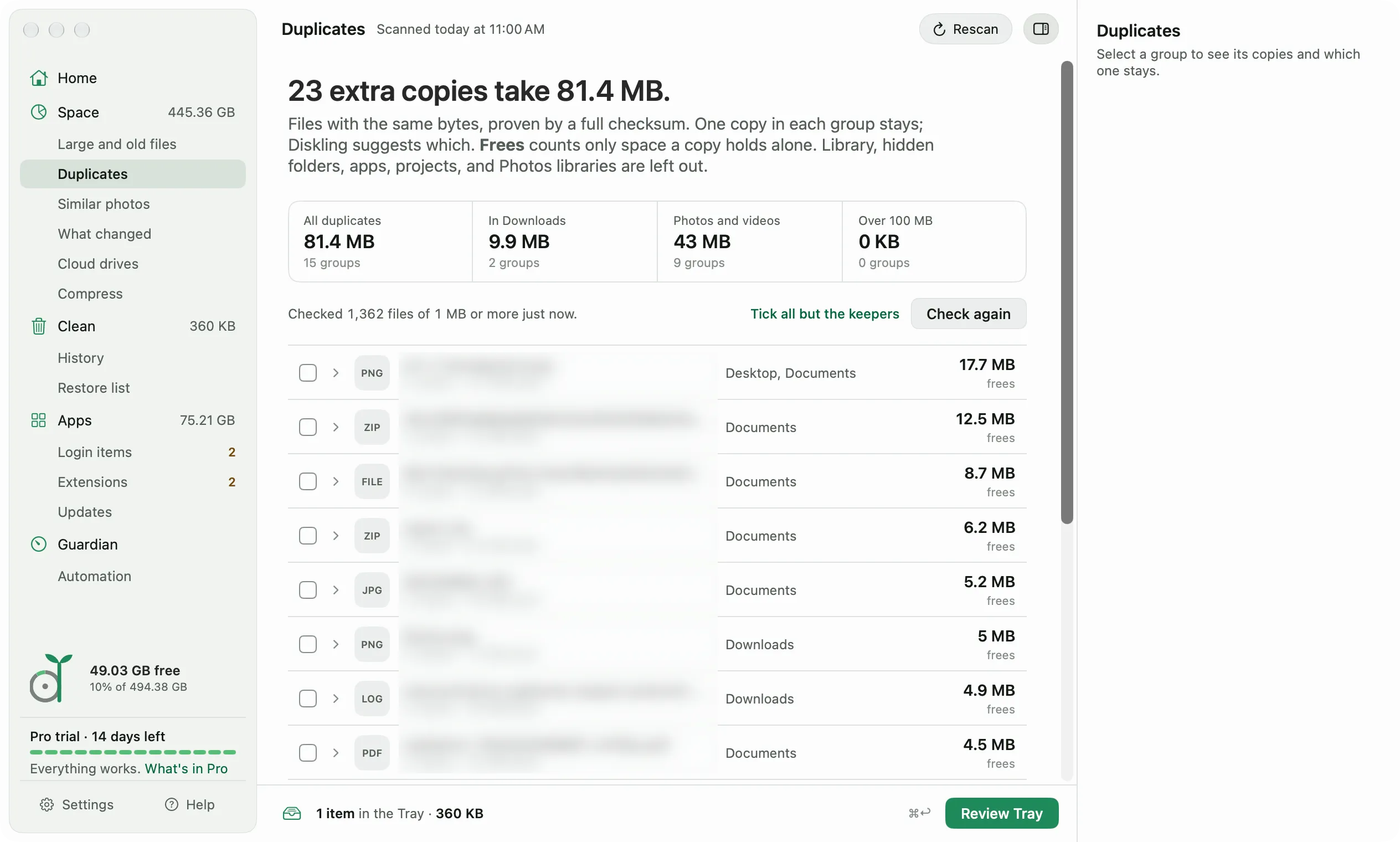
Duplicates
Free to lookExact copies proven by a full checksum. The oldest is kept, and Tick all but the keepers does the rest.
Similar photos
Free to lookBursts, near-identical screenshots, and resized copies, compared on your Mac with Apple’s Vision framework.
Cloud drives
Free to lookHow much of iCloud Drive, Dropbox, Google Drive, OneDrive, and Box is stored on this Mac. Make iCloud folders online-only with Pro.
Needed offline
FreeFolders you always want on this Mac stay put. Obsidian vaults are added for you.
Compress
ProVideos to HEVC and photos to HEIC or JPEG, with a before and after crop, and every new file checked first.
Offload
ProMove big files to an external drive, a network drive, or iCloud Drive, checked byte for byte.
05 · Apps
Remove apps completely
Dragging an app to the Trash leaves its data behind in your Library. Diskling finds that data, and what keeps running, and removes it with the app.
How uninstalling works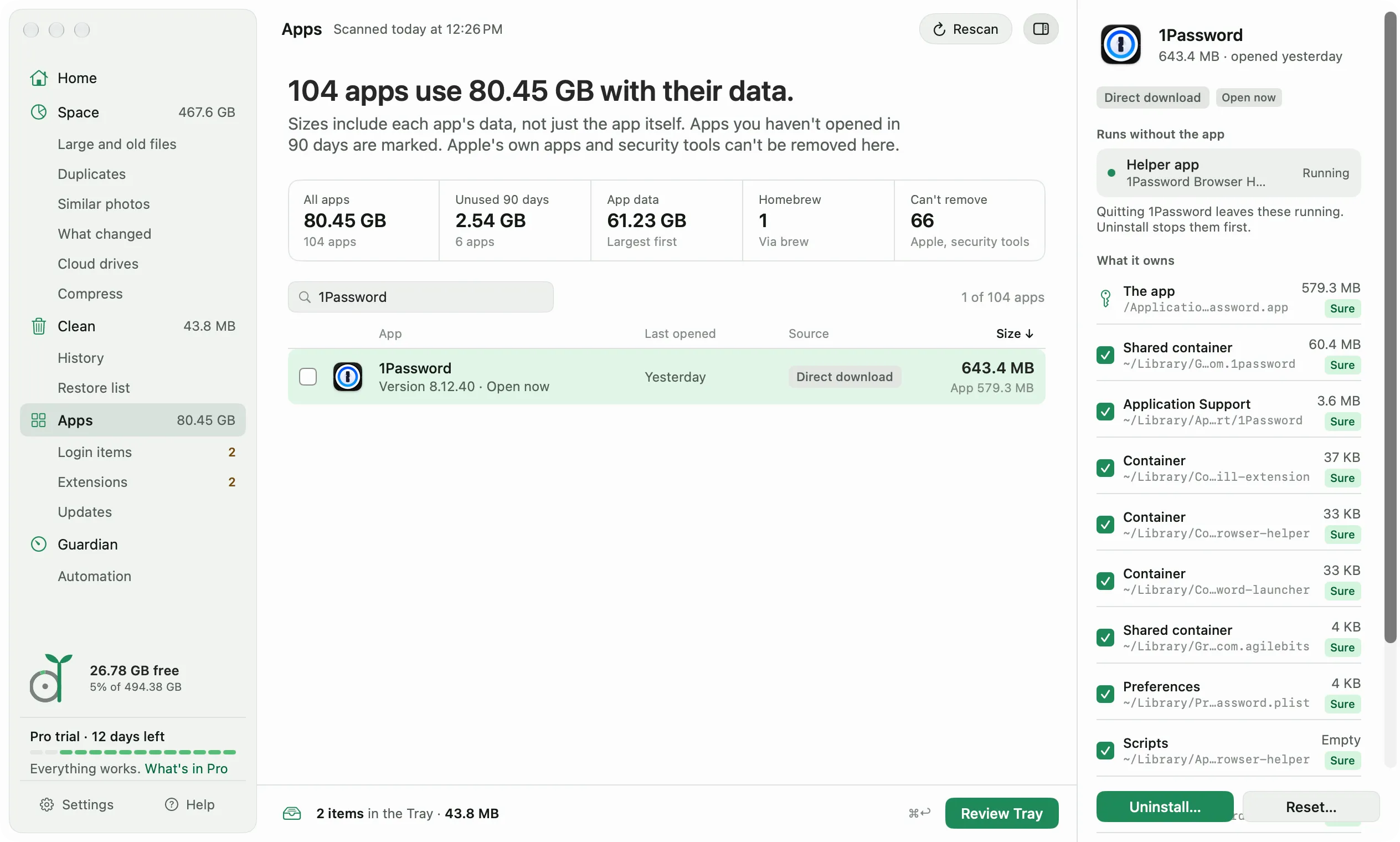
Real app sizes
FreeEach app with its data, when you last opened it, where it came from, and a mark if unused for 90 days.
Uninstall with leftovers
FreeThe app and everything it owns, each part with how sure Diskling is. One app at a time on Free, several at once with Pro.
Uninstall from Finder
FreeDrag an app onto Diskling, or right-click it in Finder and choose Services, Uninstall with Diskling.
Runs without the app
FreeHelpers, extensions, and login jobs that keep running after you quit an app. Uninstall stops them first.
Settings that still mention it
FreeAfter an uninstall, the shell and AI tool settings files that still mention the app, by file and line. Diskling never shows the line or edits the file.
Homebrew apps
FreeApps you installed with Homebrew are removed through Homebrew, so it knows they’re gone.
App Reset
ProClear an app’s caches and settings without removing it, for an app that has stopped behaving.
Login items
Free to lookEverything that starts with your Mac, grouped by app. Turning items off needs Pro.
Extensions
Free to lookShare, Finder, and Quick Look extensions, browser connectors, plug-ins, and settings panes. Removing them needs Pro.
App updates
Free to lookChecks which apps have updates only when you press the button. Upgrading Homebrew apps from here needs Pro.
06 · Guardian
Keep it from filling up again
Guardian watches free space from the menu bar, even when Diskling is closed, and tells you once when it gets low.
How Guardian works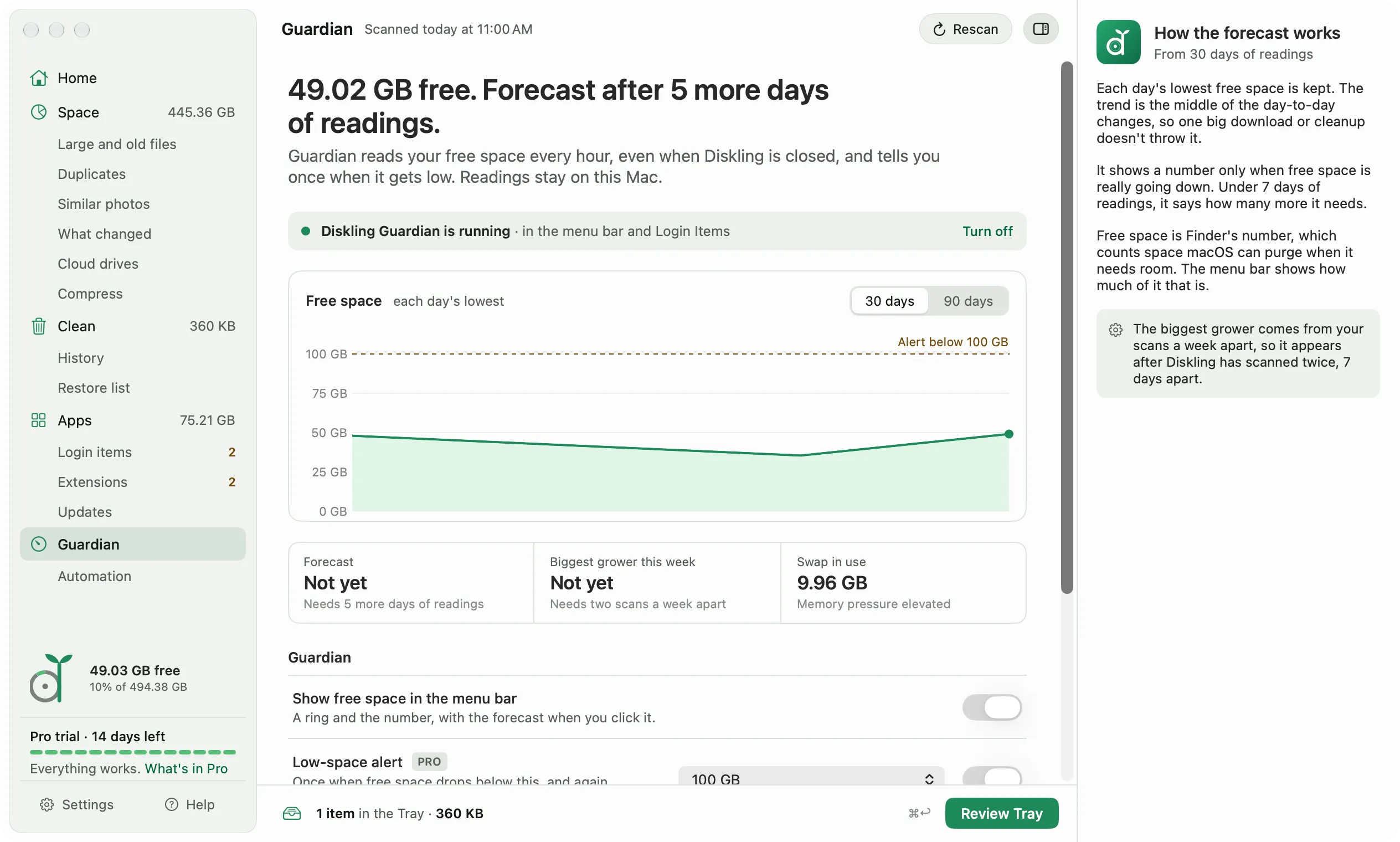
Menu bar ring
FreeFree space in your menu bar, with purgeable space, swap, and memory pressure one click away.
Free space chart
FreeEach day’s lowest free space over 30 or 90 days.
Forecast
ProWhen your disk will be full if things keep going, after 7 days of readings.
Low-space and swap alerts
ProOne alert when free space drops below your line, and one when memory is tight and swap is short of room.
Biggest grower
ProWhich folder grew the most this week, from two scans a week apart.
Weekly summary
ProA note on the day you pick with how much space you gained and what grew the most.
Trash watch
ProDrag an app to the Trash, and Guardian tells you what it left behind.
Maintenance
ProThin local Time Machine snapshots, rebuild Spotlight, and clear old Open With entries, each only when you click it.
Menu bar or Dock
FreeRun Diskling from the menu bar without a Dock icon, or the other way around.
07 · Automate
Let it run on its own
Scan on a schedule, clear what always comes back, and ask Diskling from Shortcuts or Terminal.
How scheduled scans and rules work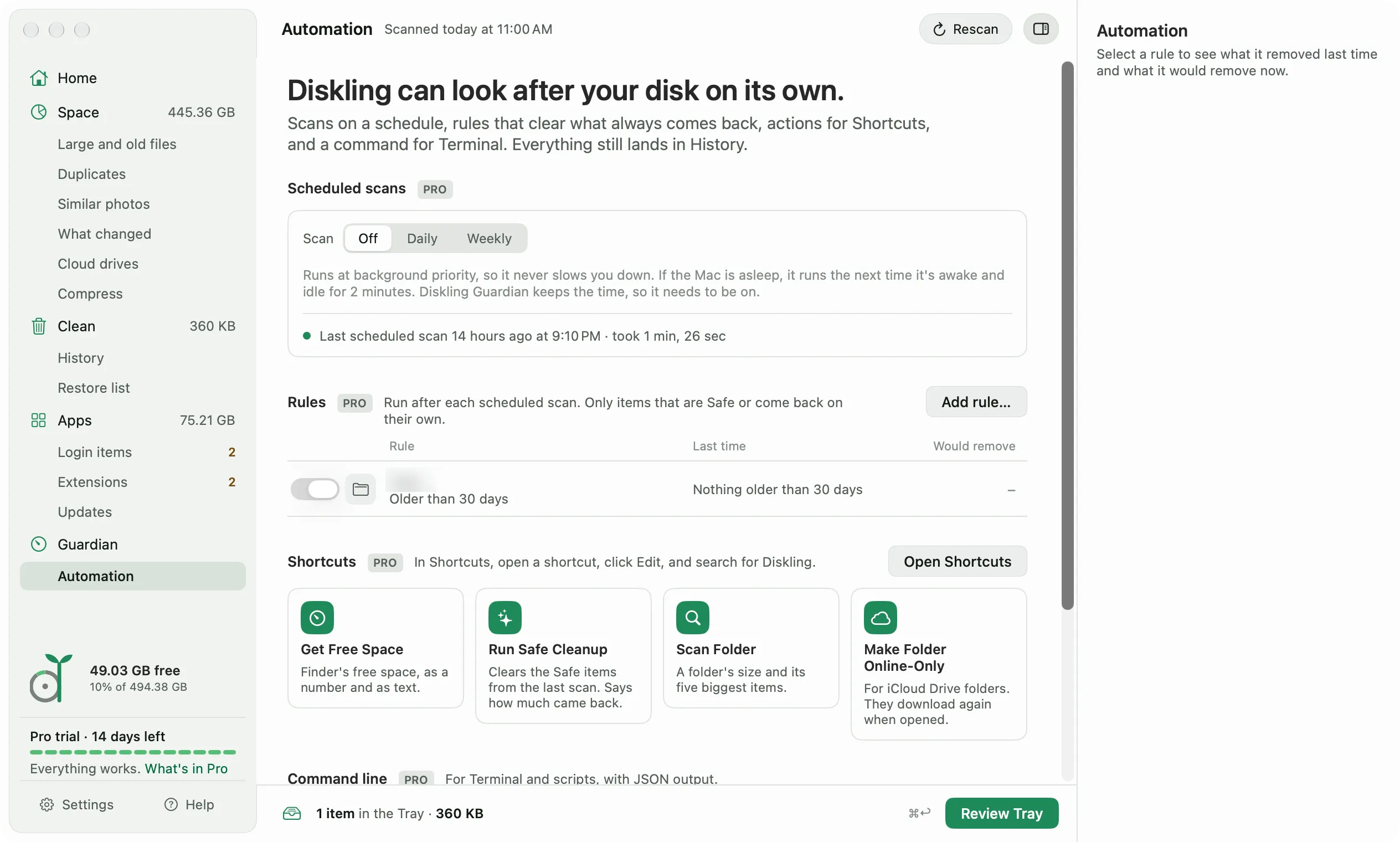
Scheduled scans
ProDaily or weekly, at background priority, and only when plugged in if you like.
Cleanup rules
ProClear Safe or rebuildable items after each scheduled scan, with what each rule removed last time.
Shortcuts actions
ProGet Free Space, Run Safe Cleanup, Scan Folder, and Make Folder Online-Only, with Siri phrases for the first two.
Command line
Prodiskling space, scan, why, and clean with a dry run, all with JSON output for scripts.
08 · Privacy
Private by design
Diskling does its work on your Mac. There’s no account and no analytics, and it connects for two things you can turn off.
What stays on your Mac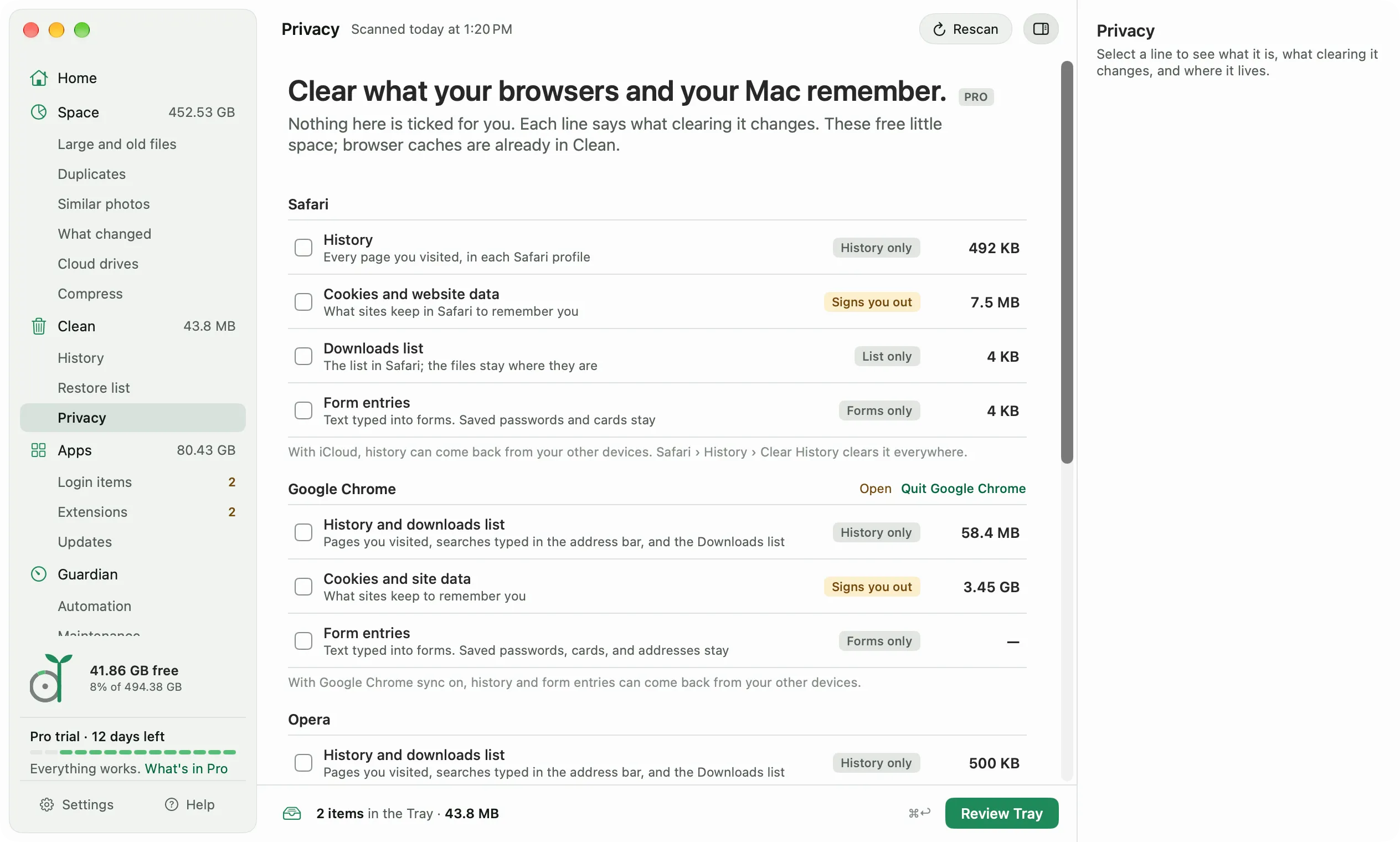
Privacy cleanup
ProHistory, cookies, downloads lists, and form entries for Safari, Chrome, Edge, Brave, Arc, Opera, and Firefox, plus recent items. Passwords and bookmarks stay.
No account, no analytics
FreeDiskling connects only to check for updates and new rules, and one switch turns both off.
Signed rule updates
FreeNew owner rules are signed, checked before use, and free for everyone, Free or Pro.
Signed app updates
FreeUpdates come through Sparkle and are signed, so you know they’re from us.
Reports only when you send them
FreeDiagnostics and crash reports leave your Mac only when you send them yourself, with folder paths left out by default.
Left out on purpose
Some cleaner features do nothing you’d notice, or belong in another app. Diskling skips them.
Malware scanning
Diskling is a disk tool. macOS has its own malware protection, and security apps do the rest.
Freeing RAM and speed-up buttons
macOS manages memory itself, so a button would do nothing you’d notice.
DNS flushing
macOS handles it, and it frees no space.
File shredding
Overwriting a file doesn’t reliably erase it on an SSD. FileVault encryption protects your files instead.
Signing in to your accounts
Diskling never asks for your Gmail or cloud passwords. It measures what’s on this Mac.
CPU and battery dashboards
Activity Monitor does that well already.
Free shows you everything above. Compare Free and Pro