
On October 21, I measured Claude’s folders on my Mac. I’d just finished the AssetsV2 post and was looking for the next thing I couldn’t explain. Between the Claude app and Claude Code, Claude was using 20.3 GB, and 12 GB of that sat in one folder called vm_bundles.
I took it apart folder by folder. Most of it turned out to be two things: the virtual machine Cowork runs in, and a word-for-word record of every Claude Code session.
Claude keeps data in two main places on a Mac. ~/Library/Application Support/Claude belongs to the Claude app, and its vm_bundles folder is the virtual machine that Cowork runs in. ~/.claude belongs to Claude Code and is mostly session transcripts, which it deletes after 30 days by default. Clear space with the app’s Settings, Storage and with claude purge, not by deleting folders by hand.
Where the 20 GB went
Claude’s data sits in three folders. This measures all of them at once:
du -shx ~/.claude ~/Library/Application\ Support/Claude ~/.local/share/claudeOn October 21 that printed 4.4 GB, 15 GB and 670 MB. When I split those folders by what’s inside, it looked like this:
Two folders hold most of it, and they work in very different ways.
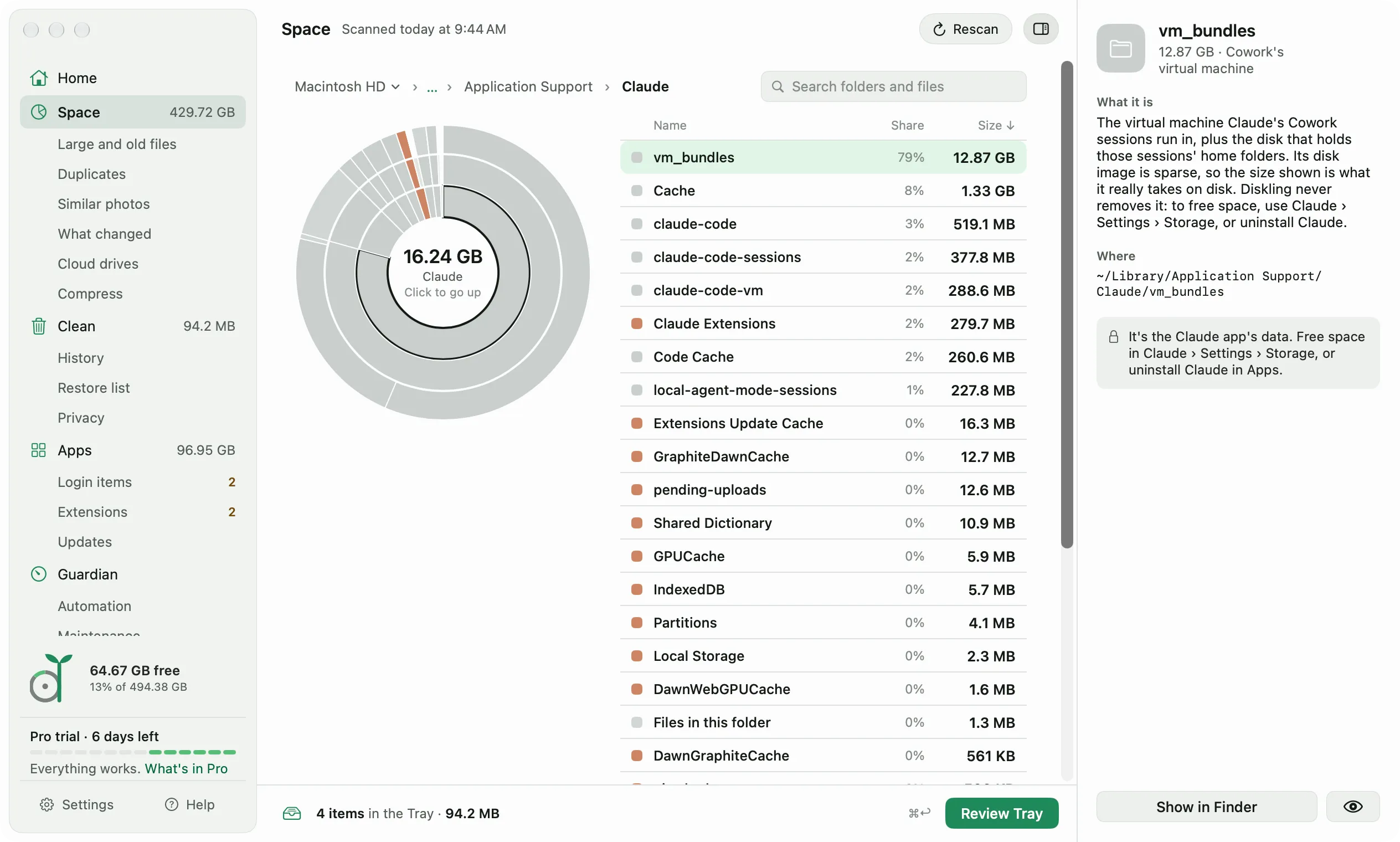
vm_bundles: the virtual machine Cowork runs in
Cowork, the Claude app’s agent mode, runs its tasks inside a Linux virtual machine. Anthropic’s documentation for business deployments of the Claude app calls vm_bundles the “cached copy of the VM workspace bundle that Cowork sessions run in”, plus a data disk for those sessions.
On October 21, two files inside it made up almost all of the 12 GB:
du -shx ~/Library/Application\ Support/Claude/vm_bundles/claudevm.bundle/*.imgrootfs.img is the virtual machine’s system disk. Finder and ls show it as 10 GB, but du said it took 8.5 GB, the same trick Docker’s disk image plays. The file can say 10 GB while the disk only holds the parts that were written. sessiondata.img is the data disk for Cowork sessions, 3.4 GB.
I couldn’t find any Anthropic guidance that says deleting vm_bundles by hand is safe, so I wouldn’t do it. The Claude app has its own way. Cowork’s changelog for version 3.1623.0, from October 20, added Storage to Settings. It shows how much disk space Claude uses and lets you remove inactive Cowork tasks and Code sessions. The same entry says typing /storage in Cowork or Code opens it, and so does a low disk space warning.
From version 3.6556.1 on October 22, the changelog puts Storage under Settings, This computer, System, so look there first. The newest entry on that changelog is 4.29.0, from October 27, and that’s the version on my Mac.
~/.claude: every Claude Code session, word for word
Claude Code keeps a full transcript of every session in ~/.claude/projects: each message, each tool call, and everything those tools returned. On October 21 that was 3,113 transcripts since July, counting the ones Claude’s subagents write, 3.95 GB in all.
Most transcripts are small, 0.7 MB in the middle of the range. A few long sessions carry the weight. Six transcripts over 50 MB came to 557 MB together, and the biggest single one was 207 MB.
The folder grows with how much you use Claude Code, and in October it grew fast:
Why old transcripts were still there
Claude Code cleans this folder up on its own. Anthropic’s docs on the .claude directory say it deletes transcripts older than cleanupPeriodDays, 30 days by default. Even so, 177 transcripts older than 30 days were still there on October 21.
The same docs page gave me the reason. Claude Code keeps the transcript of a session you started or last continued in the Claude app or Cowork at any age, unless you set desktopSessionCleanupPeriodDays.
You can set both limits in ~/.claude/settings.json:
{
  "cleanupPeriodDays": 14,
  "desktopSessionCleanupPeriodDays": 30
}
To clear one project right away, claude purge lists what it would delete and asks before it deletes anything. Start with a dry run, which deletes nothing:
claude purge ~/path/to/project --dry-runDeleting a project’s state means you can’t resume, continue, or rewind its sessions, and the project’s auto memory goes with it. The docs list what else goes: the project’s lines in your prompt history and its entry in ~/.claude.json. Before Claude Code 2.1.288, the command was claude project purge.
The rest of ~/.claude that can go is small. Debug logs, plan files, shell snapshots and config backups are on the docs’ list of things you can delete without losing anything you use. On October 28 they came to under 1 MB on my Mac. Leave settings.json and plugins alone: the docs say those hold your preferences and installed plugins.
Anthropic’s docs point out that anything a tool reads ends up in the transcript, including a credential printed by a command or read from a .env file. A shorter cleanupPeriodDays keeps less of that on disk.
Old copies of Claude Code
Claude Code kept three versions of itself in ~/.local/share/claude/versions, about 220 MB each. The Claude app kept two more copies of its own, plus one for the virtual machine. Together that was 1.41 GB.
I left them alone. Anthropic’s docs only cover removing that folder when you uninstall Claude Code completely.
A week later: 23 GB
On October 28, I ran the same du command again for this update. It printed 5.4 GB, 17 GB and 670 MB. That’s 23 GB, almost 3 GB more than a week before.
vm_bundles went from 12 GB to 14 GB. rootfs.img took 9.4 GB instead of 8.5 GB, and a new 1.2 GB file sat next to it, rootfs.img.zst, dated October 24. sessiondata.img hadn’t changed.
~/.claude/projects went from 3.95 GB to 4.9 GB, and from 3,113 transcripts to 3,529. Of those, 2.4 GB had been written in the previous seven days.
The old files were a different story. 226 were older than 30 days, and together they came to only 89 MB. I checked what they were. Each one was either a session started in the Claude app, the kind the docs say is kept at any age, or a subagent transcript from inside one of those sessions. None came from Claude Code in Terminal.
So the 30-day cleanup was working. Most of the space was in sessions from the last few weeks.
Clearing it without breaking Claude
What I’d do: let Claude clear its own data, and delete nothing by hand.
- Open the Claude app’s Settings, Storage, and remove Cowork tasks and Code sessions you’re done with.
- Run
claude purge --dry-runfor old projects, then purge the ones you won’t come back to. - Lower
cleanupPeriodDays, and setdesktopSessionCleanupPeriodDaysso app sessions age out too. - Leave
vm_bundlesand the version folders to Claude.
On my Mac, step 2 would free the most space in Claude Code, because the big sessions were the recent ones.
What Diskling shows here
Diskling splits Claude into its parts, each with its own explanation. It shows the Cowork VM’s real size and points you to Claude’s Settings, Storage instead of removing it. Claude Code transcripts are grouped by project and cleared with Claude Code’s own claude purge, with its dry-run plan shown first. Seeing all of it is free, and clearing from Clean is part of Pro.
Questions people ask
Is it safe to delete the .claude folder on a Mac?
Not the whole folder. ~/.claude also holds your settings, your installed plugins and each project’s auto memory, and Anthropic’s docs say not to delete settings.json or plugins. The session transcripts in ~/.claude/projects can go, but you lose resume, rewind and auto memory for those projects. claude purge removes them one project at a time and shows its plan first.
What is vm_bundles in the Claude folder?
It’s the virtual machine Cowork runs its tasks in, at ~/Library/Application Support/Claude/vm_bundles. On my Mac it was 12 GB on October 21 and 14 GB on October 28. Clear it from the Claude app’s Settings, Storage, not by hand.
Does Claude Code delete old sessions on its own?
Yes, after 30 days by default. You change that with cleanupPeriodDays. Sessions started or last continued in the Claude app or Cowork are kept at any age, unless you also set desktopSessionCleanupPeriodDays.
Why does Claude keep growing?
Every session adds a transcript, and every Cowork task runs in the virtual machine. Here, Claude Code’s history went from 26 MB in July and August together to 3.3 GB in the first three weeks of October.
A virtual machine and a full record of every session are what make Cowork and resuming work, and both cost space. What surprised me was the speed: almost 3 GB more in one week, and only 89 MB of it old enough for the cleanup to touch. If you started using Claude Code this month, run that du command today and write the number down. Run it again next week. That second number is the one that tells you whether the cleanup can keep up.

I'm the product manager for Diskling, which mostly means asking "but what if" until nothing breaks. I studied soil science before software, and outside work it's family, farming and whatever I'm learning next.
Comments
No comments yet. Tried this on your Mac? Tell me how it went.