
Before writing this post, I went to clear Xcode’s DerivedData on my Mac. Diskling, the Mac app we build, is an Xcode project, so I expected a big number. Then du printed this:
du -sh ~/Library/Developer/Xcode/DerivedData
 99M	/Users/me/Library/Developer/Xcode/DerivedData
99 MB. One folder, for Diskling.
So I looked inside the Diskling project folder itself. It had a folder called build, and du put it at 1.6 GB. It was build data for the same project, in a folder none of the three top-ranking guides I read on deleting DerivedData mention.
Xcode keeps build data in ~/Library/Developer/Xcode/DerivedData, one folder per project. Quit Xcode and delete a project’s folder. Product, Delete Derived Data in Xcode 27.2 clears the whole folder, every project at once. Builds run with -derivedDataPath keep their own copy, often inside the project, so check there too.
What’s in DerivedData
DerivedData is everything Xcode makes while it builds your app. When I built Diskling into an empty folder, Xcode filled it with the finished app, compiled modules, the search index, logs, and the Swift packages the project uses. All of it comes from your code and your package list.
Each project gets its own folder, named after the project plus a string of letters. Mine is Diskling-cfolwlampxwzfvaibyzpwojwndbt. Inside it, a small info.plist says which project the folder belongs to:
plutil -p ~/Library/Developer/Xcode/DerivedData/Diskling-*/info.plist
{
  "LastAccessedDate" => 2026-10-28 07:26:10 +0000
  "WorkspacePath" => "/Users/me/Diskling/diskling/Diskling.xcodeproj"
}
Where my 1.6 GB came from
The build folder had an info.plist too, pointing at the same project. It was DerivedData, just not in the default place.
The reason is one flag. The build command in my project notes ends with -derivedDataPath build:
xcodebuild -project Diskling.xcodeproj -scheme Diskling -configuration Debug -derivedDataPath build buildThe xcodebuild manual says this flag “overrides the folder that should be used for derived data”. So a build run from Terminal with it writes into the project’s build folder. A build from the Xcode app writes into ~/Library/Developer/Xcode/DerivedData.
My release script passes its own path, build-release, and that folder held another 573 MB, release files included.
The build folder was created on September 30 and last written on October 28. When I built the same app fresh, it came to 603 MB. The rest of that 1.6 GB had piled up over that month of builds.
Any script or tool that runs xcodebuild can pass this flag. To check a project, run this inside its folder:
grep -rn derivedDataPath .On my project it found both, build and build-release, in under a second.
Clean Build Folder or Delete Derived Data?
Xcode’s Product menu has two commands for this, one under the other, and they sound alike. My Mac runs Xcode 27.2 now, and the menu is the same as in 27.1.
Clean Build Folder: Shift-Command-K. Xcode describes it as removing build products and intermediate files. When a build acts strange, it’s the lighter thing to try first.
Hold Option and it becomes Clean Build Folder Immediately, the same clean without the question first.
Delete Derived Data: right below it, with no shortcut.
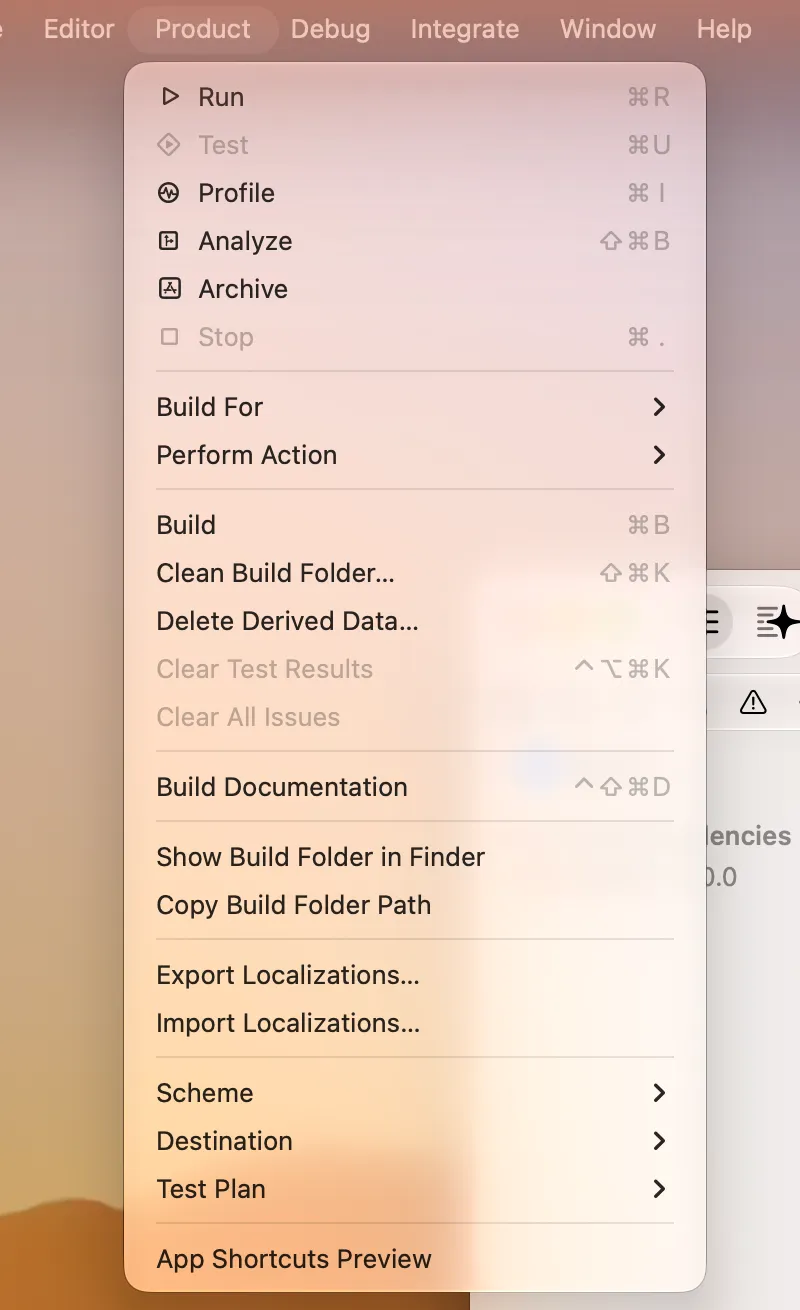
I expected it to clear the open project, since that’s where the menu is. The confirmation says otherwise. It deletes everything in ~/Library/Developer/Xcode/DerivedData, every project’s products and intermediates plus the shared module and compilation caches, and it says it can’t be undone.
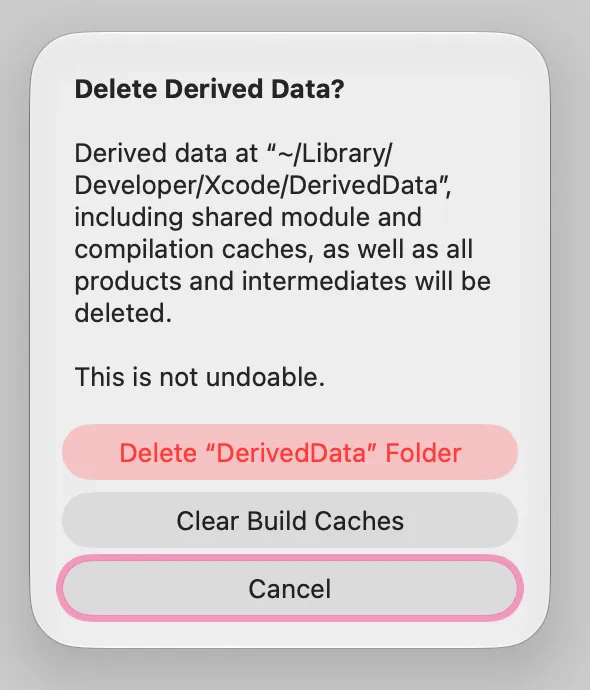
The dialog has a third choice, Clear Build Caches. I didn’t press it or the delete button, so I can’t say what Clear Build Caches leaves behind. For one project, use the Finder steps below.
Delete one project’s DerivedData
- Quit Xcode. Apple’s own workaround in the Xcode 26 release notes goes in this order: quit Xcode, clean out the project’s DerivedData, then restart Xcode.
- In Finder, press Shift-Command-G and paste
~/Library/Developer/Xcode/DerivedData. - Find the folder that starts with your project’s name, and move it to the Trash.
- Open the project and build it. Xcode makes the folder again.

To clear every project at once from Terminal:
rm -rf ~/Library/Developer/Xcode/DerivedDatarm -rf skips the Trash, so there’s no getting the files back. For DerivedData that’s fine, since Xcode rebuilds it. Read the path twice before you press Return.
For a -derivedDataPath folder like my build, quit anything that’s building, then delete that folder the same way.
What deleting it costs you
After a delete, the next build starts from nothing, and I wanted to know how long that takes. So I copied the Diskling source into a scratch folder and built it into a DerivedData folder that didn’t exist yet. I turned code signing off, so the test build didn’t need a certificate:
xcodebuild -project Diskling.xcodeproj -scheme Diskling -configuration Debug -derivedDataPath ../dd CODE_SIGNING_ALLOWED=NO buildOn my MacBook Pro with an M3 Pro, running Xcode 27.1, the two builds came out like this:
| Build | Time | DerivedData after |
|---|---|---|
| From an empty folder | 72.96 seconds | 603 MB |
| Again, nothing changed | 6.14 seconds | 608 MB |
Measured with /usr/bin/time and du -sh on November 1, 2026. xcodebuild made the dd folder itself on the first build.
I only timed the Terminal build. I haven’t measured how long the Xcode app takes to index a project again after a delete, and indexing is the part you’d notice while typing.
Find DerivedData for projects you deleted
Projects get moved, renamed and deleted. Their DerivedData folders stay behind. This loop reads each folder’s info.plist and checks whether the project is still at that path:
cd ~/Library/Developer/Xcode/DerivedData
for d in */; do
  p=$(plutil -extract WorkspacePath raw "$d/info.plist" 2>/dev/null)
  if [ -e "$p" ]; then s="ok"; else s="MISSING"; fi
  echo "$(du -sh "$d" | cut -f1)  $s  ${d%/}  $p"
done
On my Mac, it printed one line:
99M ok Diskling-cfolwlampxwzfvaibyzpwojwndbt /Users/me/Diskling/diskling/Diskling.xcodeprojTo see what a leftover looks like, I moved my scratch copy of the project and ran the same loop over the test folder, which I’d named Diskling-test. I’ve shortened the scratch path:
608M MISSING Diskling-test /Users/me/scratch/dl/Diskling.xcodeprojA MISSING line means no project exists at that path any more, so nothing there can use the folder. Those are the first ones I’d delete.
Is it worth clearing all of it?
What I’d do: delete one project’s folder when its builds act strange, and leave the rest alone. Clearing all of DerivedData means a slow first build for every project. On my Mac, it would also free just 99 MB.
If you’re cleaning for space, DerivedData is rarely the big one. On the same Mac, du -shx ~/Library/Developer/CoreSimulator says 15 GB, over a hundred times my DerivedData. Old simulators are the bigger win, and there’s a separate post on deleting old iOS simulators without breaking Xcode.
What Diskling shows here
Diskling lists Xcode’s DerivedData folder in Clean as Xcode build data, with what it is and what happens if you remove it: Xcode makes it again on your next build, which takes longer the first time. It isn’t ticked for you.
A build folder made with -derivedDataPath isn’t named yet, so it only shows up as part of your project folder’s size. Seeing it is free, and clearing from Clean is part of Pro.
Questions people ask
Can I delete DerivedData in Xcode?
Yes. Everything in it is made from your project, and Xcode makes it again on the next build. Quit Xcode first. The cost is a slower first build: for my app, 73 seconds instead of 6.
Where is DerivedData on a Mac?
By default in ~/Library/Developer/Xcode/DerivedData, one folder per project. A build run with -derivedDataPath uses the folder that flag names instead, which is often inside the project.
How do I delete DerivedData from Terminal?
Run rm -rf ~/Library/Developer/Xcode/DerivedData to remove all of it. For one project, use rm -rf ~/Library/Developer/Xcode/DerivedData/YourProject-* with your project’s name. Neither one uses the Trash.
What’s the difference between Clean Build Folder and Delete Derived Data?
Clean Build Folder, Shift-Command-K, removes build products and intermediate files, by Xcode’s own description. Delete Derived Data removes the whole ~/Library/Developer/Xcode/DerivedData folder, every project at once, including the shared module and compilation caches. That’s what its confirmation in Xcode 27.2 says.
Does Xcode 27 have a Delete Derived Data option?
Xcode 27.1 and 27.2 do. It’s in the Product menu, right below Clean Build Folder. In 27.2 it clears DerivedData for every project, not only the one you have open.

I'm the product manager for Diskling, which mostly means asking "but what if" until nothing breaks. I studied soil science before software, and outside work it's family, farming and whatever I'm learning next.
Comments
No comments yet. Tried this on your Mac? Tell me how it went.